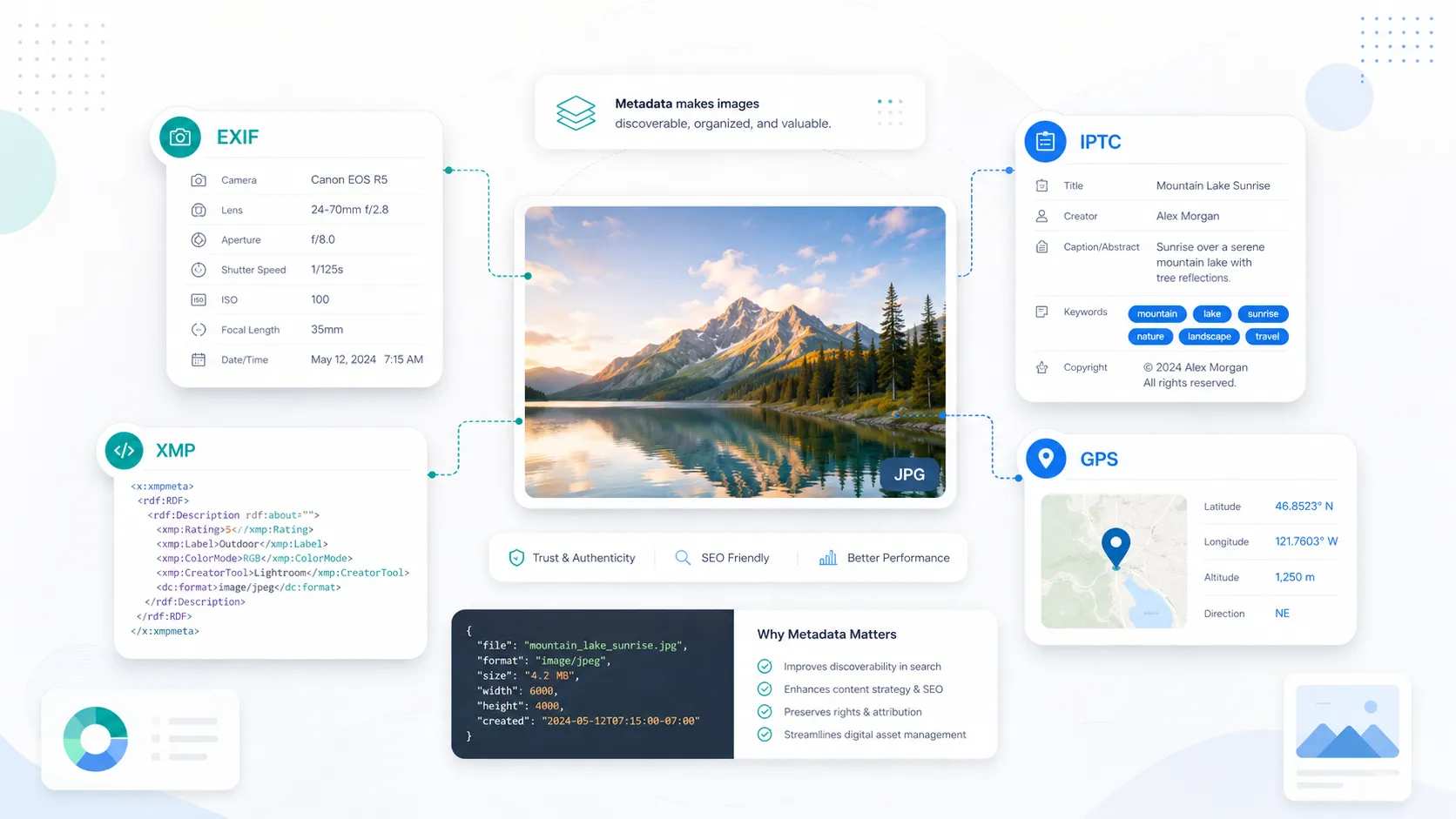
Understanding Image Metadata: EXIF, IPTC, XMP and GPS Data Explained
If you work with photos online, image metadata matters more than most people realize.
It affects how images are organized, how photographers preserve authorship and rights information, how teams manage large libraries, and how businesses keep visual assets consistent across websites, listings, and campaigns. It also creates a lot of confusion. Many people use terms like EXIF, IPTC, XMP, GPS data, captions, alt text, and geotagging interchangeably even though they do different jobs.
This guide breaks the topic down in plain English.
You’ll learn what image metadata is, how EXIF, IPTC, XMP, and GPS data differ, where image SEO fits into the picture, and what each type of metadata is best used for if you’re a photographer, local business, marketer, or content creator.
What image metadata actually is
Image metadata is the information stored inside or attached to an image file that describes the image, the image source, or how the file should be used.
Think of it as the data layer behind the pixels.
That data can include technical camera details, author information, copyright fields, descriptions, tags, editing history, and geographic location. Some of it is created automatically by the device that captured the image. Some of it is added later by editing software, DAM systems, CMS workflows, or metadata tools.
A lot of confusion starts here: not all image-related information lives in the same place.
For example, HTML alt text is page-level information added to the website markup, while EXIF, IPTC, and XMP are file-level metadata stored in or alongside the image. That distinction matters. A photo can have excellent embedded metadata and still have poor on-page SEO if the filename, alt text, surrounding copy, and page context are weak.
EXIF metadata explained
EXIF stands for Exchangeable Image File Format. It is the technical metadata layer most people first encounter because cameras and smartphones often write it automatically.
EXIF is usually the best place to look for capture details such as:
- camera make and model
- lens information
- shutter speed
- aperture
- ISO
- focal length
- date and time created
- orientation
- image dimensions
- device-generated GPS data when location services are enabled
If you have ever opened a photo and checked when it was taken, what phone captured it, or what lens was used, you were probably looking at EXIF.
For photographers, EXIF is extremely useful for analysis, sorting, troubleshooting, and archiving. For teams that manage field photos, it can also help with timestamps, device consistency, and location records.
But EXIF has limits. It is not the ideal place for rich editorial descriptions, marketing copy, rights management text, or carefully controlled keywords. It tells you a lot about how the photo was made, but not enough about how the photo should be understood or reused.
Simple EXIF example
A restaurant owner uploads a photo of a finished dining room. EXIF may tell you that the image was captured on an iPhone, at a certain time, with a specific focal length, and with GPS enabled. Useful? Yes. But it still does not tell Google or your team who created the image, what service it represents, or what licensing terms apply.
IPTC metadata explained
IPTC metadata is the descriptive and administrative layer used heavily in publishing, editorial, stock photography, and rights-sensitive workflows.
If EXIF tells you how the image was captured, IPTC helps tell you what the image is, who created it, and how it may be used.
Common IPTC fields include:
- creator
- credit line
- copyright notice
- caption or description
- keywords
- location fields
- usage and licensing information
- source and contact details
This is the metadata photographers, agencies, museums, brands, and publishers often rely on when they want images to remain attributable and organized across systems.
For SEO and discoverability, IPTC matters because it can help preserve descriptive and rights-related information as files move between tools and platforms. It is especially valuable for photographers and brands that want clear ownership, licensing, and credit signals attached to their images.
Simple IPTC example
A wedding photographer exports a gallery image and adds:
- Creator: Jane Smith
- Credit Line: Jane Smith Photography
- Copyright Notice: © Jane Smith Photography
- Description: Outdoor wedding ceremony at sunset in Austin, Texas
- Keywords: outdoor wedding, Austin wedding venue, sunset ceremony
Now the file carries editorial context and rights information instead of only camera data.
XMP metadata explained
XMP stands for Extensible Metadata Platform. In practice, XMP is the flexible metadata framework that many modern workflows depend on.
You can think of XMP as the most adaptable metadata layer. It can store descriptive information, rights information, app-specific data, workflow states, ratings, labels, and more. It is also closely tied to how many IPTC fields are stored and exchanged in modern systems.
That is why people often get confused about IPTC and XMP. They are related, but they are not identical.
A useful way to think about it is this:
- IPTC defines many of the descriptive and rights concepts
- XMP provides a flexible framework for storing and exchanging those concepts in modern workflows
XMP is common in Adobe-based environments, DAM systems, and professional editing pipelines. It can be embedded in the file itself or stored in a sidecar file depending on the format and workflow.
What XMP is especially good for
XMP is useful when you need more than basic camera data. It handles richer descriptions, interoperability across creative tools, and workflow information that does not fit neatly into older metadata patterns.
That makes it especially important for agencies, content teams, photographers, and developers who need metadata to survive across multiple systems.
GPS data explained
GPS data is location metadata: latitude, longitude, and sometimes altitude, timestamp, direction, or related location fields.
Strictly speaking, GPS data is often stored in the GPS section of EXIF rather than being a totally separate standard. People still discuss it separately because it serves a very different purpose from camera settings or descriptive rights metadata.
GPS data is most useful when the location itself matters.
That includes:
- local business photo workflows
- field inspections
- construction and site documentation
- tourism and travel photography
- map-based image organization
- before-and-after location records
- proof-of-visit or proof-of-work documentation
For local businesses, GPS data can support internal organization and location consistency across your image workflow. For photographers, it can help reconstruct where a shoot happened. For teams managing large media libraries, it makes location-based sorting much easier.
At the same time, GPS deserves care. Not every image should retain exact coordinates. Public-facing images tied to private homes, schools, client sites, or sensitive locations may need location data removed before publishing.
Want to check whether a specific image actually contains embedded GPS coordinates? See our guide to checking whether a photo is geotagged for step-by-step methods on iPhone, Android, Windows, macOS, and in the browser.
How EXIF, IPTC, XMP and GPS data fit together
A simple way to understand the four is to treat them as complementary rather than competing.
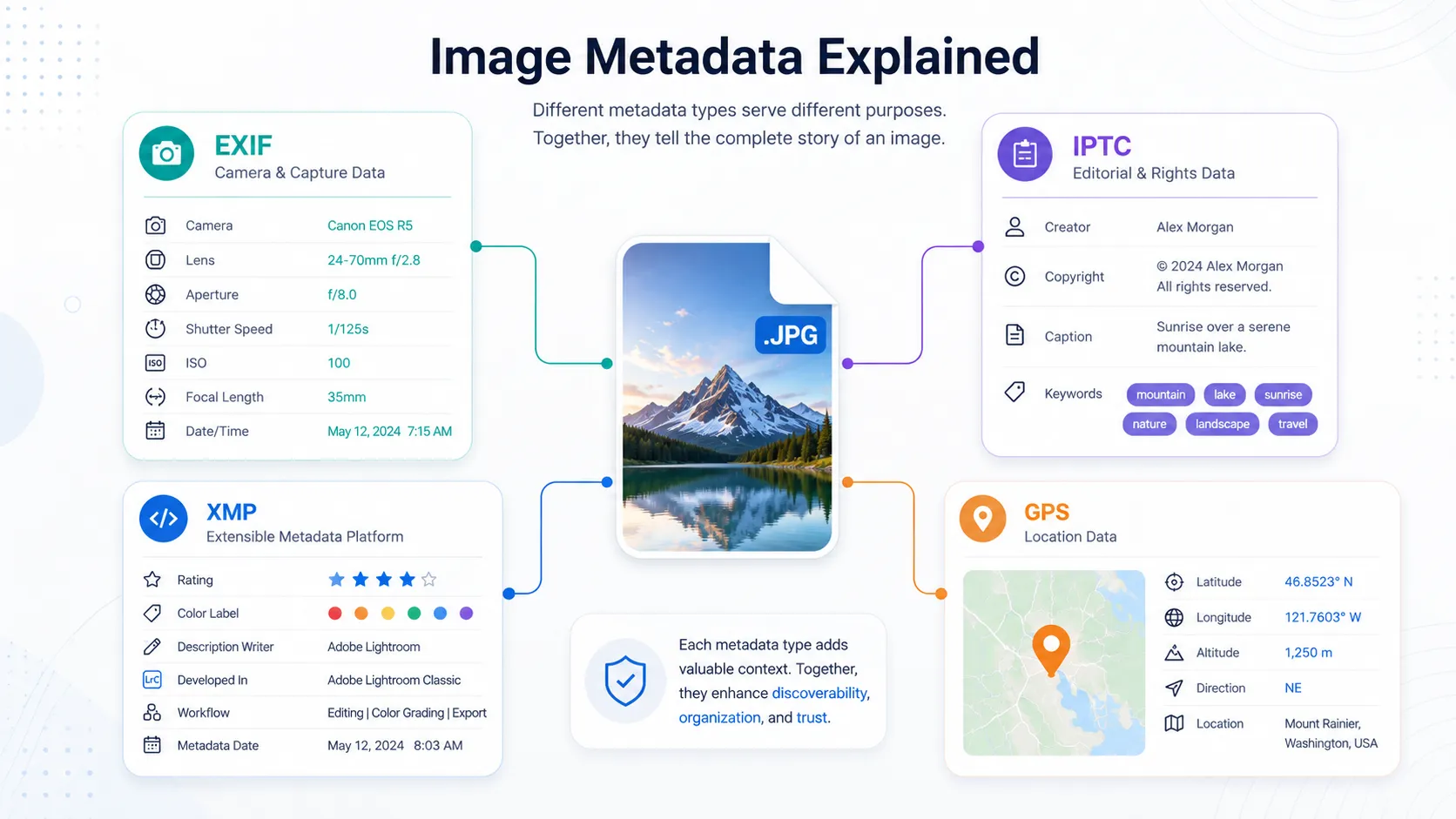 Comparison diagram showing the differences between EXIF, IPTC, XMP and GPS image metadata
| Metadata type | Best used for | Typical contents | Usually added by |
|---|---|---|---|
| EXIF | Technical capture data | camera model, shutter speed, aperture, ISO, date, orientation | camera or phone |
| IPTC | Description and rights | creator, copyright, caption, keywords, credit line | photographer, editor, team |
| XMP | Flexible workflow metadata | titles, descriptions, ratings, app data, mapped IPTC fields | editing tools, DAMs, teams |
| GPS data | Location context | latitude, longitude, altitude, map reference | device or user |
In other words:
- EXIF tells you how the image was taken
- IPTC tells you what the image is and who owns or credits it
- XMP helps systems store and exchange richer metadata cleanly
- GPS tells you where the image was captured or assigned
The strongest workflows use all of them where appropriate.
What actually matters for image SEO
This is where a lot of myths need to be cleared up.
Embedded image metadata is useful, but it is not a substitute for core image SEO. If your goal is better search visibility, Google still relies heavily on page context and page-level signals.
That means these fundamentals matter first:
- descriptive filenames
- useful alt text
- relevant surrounding copy
- strong page titles and descriptions
- image placement near the relevant section of content
- fast-loading images
- structured data when appropriate
- crawlable, indexable pages
Embedded metadata supports the workflow around those basics. It helps with organization, consistency, rights info, and portability. It can also help specialized search features and can be very useful for teams trying to standardize image publishing.
The smartest way to approach SEO is to separate “file metadata” from “webpage image optimization” and then make both work together.
A practical example
Imagine a local roofing company publishes a project photo.
A strong workflow would include:
- filename:
roof-repair-chicago-flat-roof-before-after.webp - alt text:
Flat roof repair project on a commercial building in Chicago - relevant on-page copy about the project and service area
- compressed web-friendly image dimensions
- optional creator, copyright, caption, or location metadata in the file
- consistent business and location references across the page
That combination is much stronger than relying on geotagging alone.
Recommended workflows for different audiences
For photographers
Use EXIF for technical history, keep IPTC fields for creator and copyright information, and use XMP-compatible workflows when you need metadata to move cleanly across editing tools. If location matters to the image story, keep GPS data. If privacy matters more, remove or generalize it before publishing.
For local businesses
Treat image metadata as one part of a broader local image workflow. Keep filenames descriptive, write real alt text, place images on location-relevant pages, and maintain consistent service-area context. GPS data can support your asset organization, but it should not replace strong local landing pages and useful page copy.
For content creators and marketers
Standardize descriptions, keywords, creator details, and usage rights. The goal is not to stuff metadata with keywords. The goal is to make assets understandable, portable, and consistent when they move between CMSs, freelancers, drives, social teams, and design tools.
For developers and operations teams
Always test what survives export, compression, and conversion. One of the most common mistakes in image workflows is preserving pixels while losing metadata. That becomes a problem during migrations, WebP conversion, CDN optimization, or bulk compression.
How to view, verify and manage image metadata
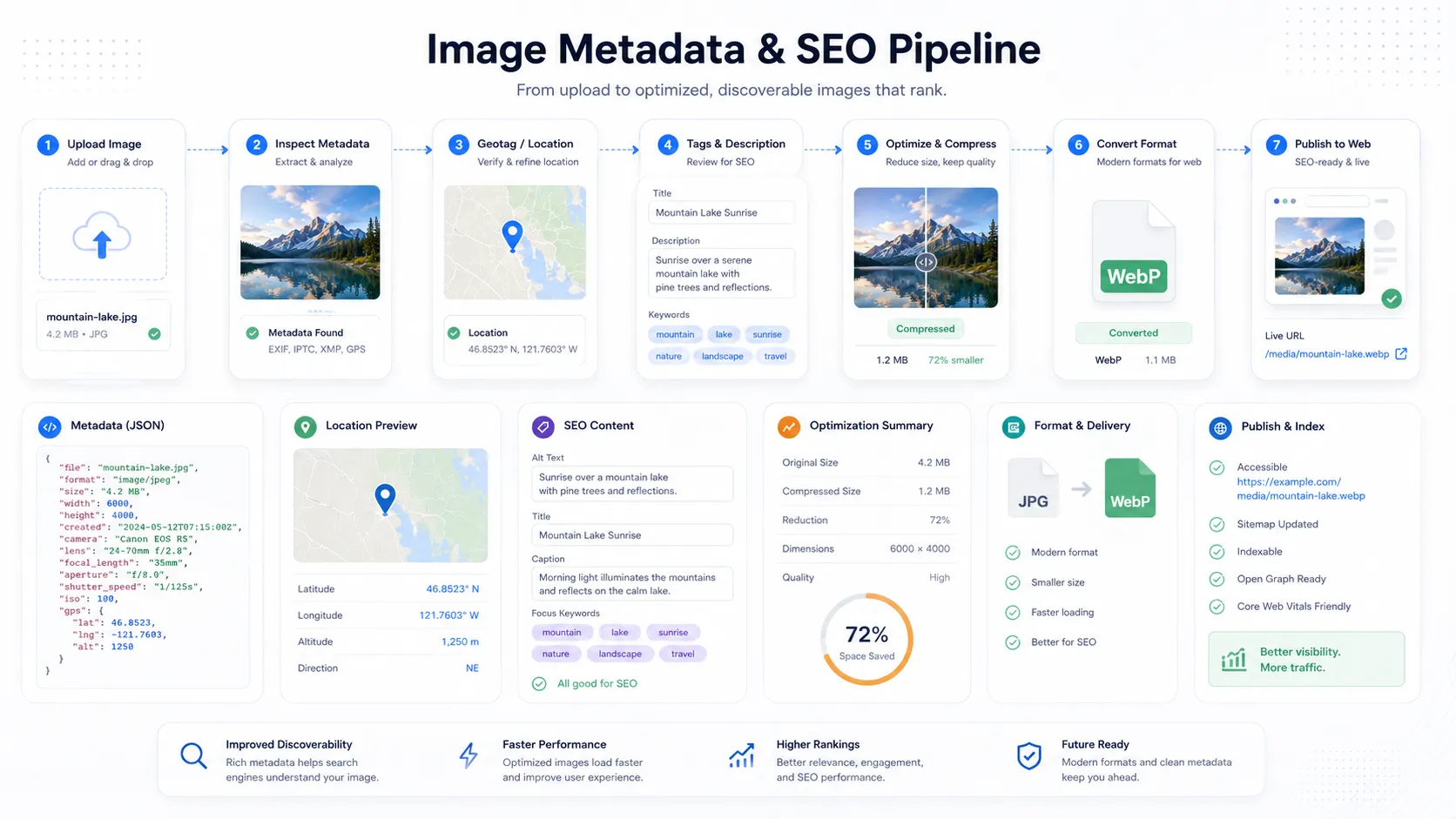 Dashboard illustration showing an image SEO workflow with metadata viewing, compression, conversion and publishing steps
If you only check metadata after something breaks, you are already behind.
The better approach is to verify images before and after any major step: upload, export, compression, conversion, or CMS publishing. That is especially important when you depend on creator details, captions, keywords, or geolocation.
If you want a simple way to inspect a file before publishing, the free Metadata Viewer lets you check EXIF, GPS, IPTC, XMP, and description-related fields in the browser. If you need broader utilities, the Tools Hub also includes an Image Compressor and Image Converter designed for modern image workflows.
For teams that need to go beyond viewing into writing and organizing metadata, GeoImageTagger combines AI-assisted location detection, editable descriptions and tags, direct metadata writing, and export workflows. You can explore the full Features, review the process on How It Works, and compare plan options on Pricing.
Frequently Asked Questions
Does image metadata directly improve SEO?
Not in the same way that page relevance, alt text, surrounding copy, crawlability, and structured data do. Embedded metadata is best viewed as supporting context and workflow data. It helps keep assets organized, portable, attributable, and easier to manage across systems, but it should complement core image SEO rather than replace it.
What is the difference between alt text and image metadata?
Alt text lives in the HTML of the webpage. It is page-level information written for accessibility and search context. EXIF, IPTC, and XMP live in or alongside the image file. They can inform workflows and sometimes feed CMS fields, but they are not the same thing.
Should I keep GPS data on every image?
No. Keep it when location adds value to your workflow, archive, or publishing use case. Remove it when privacy, client confidentiality, or sensitivity matter more than location context. Public images do not always need exact coordinates.
Can PNG, WebP and HEIC files contain metadata?
Yes, many modern formats can carry metadata, but support depends on the format and the tools in your workflow. That is why verification matters. Never assume your metadata survived a conversion just because the image looks fine.
What happens to metadata when I compress or convert images?
Some tools preserve it. Some tools strip it. Some only preserve parts of it. If your workflow depends on creator fields, captions, keywords, or GPS coordinates, check the output after every compression or conversion step.
Which metadata should most teams keep as a baseline?
A practical baseline is:
- creator or business name when relevant
- copyright notice
- useful description or caption
- keywords only when they genuinely help organization
- date information
- location data only when appropriate
- licensing or rights details if the image may be reused
If your workflow is public-facing, also make sure the webpage itself has strong filenames, alt text, and relevant copy.
If your team wants a faster way to standardize this process, GeoImageTagger can help you detect or set image locations, generate editable descriptions and tags, inspect metadata, and prepare optimized image assets through its metadata and image SEO workflow.
Want to strip metadata from your photos before sharing them online? Our free EXIF Remover tool lets you selectively remove GPS coordinates, camera info, timestamps, and other hidden metadata — directly in your browser with no sign-up required.
Need to edit metadata instead of removing it? The EXIF Metadata Editor lets you modify EXIF, IPTC, and XMP fields directly in the browser. And if you want to find where a photo was taken using visual AI — even without GPS data — try the AI Location Finder.
Conclusion
Image metadata is not a single thing. It is a stack of standards and file signals that each solve a different problem.
EXIF handles technical capture data. IPTC handles descriptive and rights information. XMP provides the modern, flexible framework that helps metadata move across tools and systems. GPS data adds location intelligence when location matters.
Once you understand those roles, your workflow gets much simpler. You stop treating metadata like a mystery, and you start using it intentionally for publishing, organization, SEO support, copyright protection, and better image operations overall.
← Back to Blog